Agent Memory Architectures
Four fundamentally different approaches to agent memory — conversational, vector, graph, and summary-based. When to use each, how to combine them, and the tools for implementation.

The Memory Problem
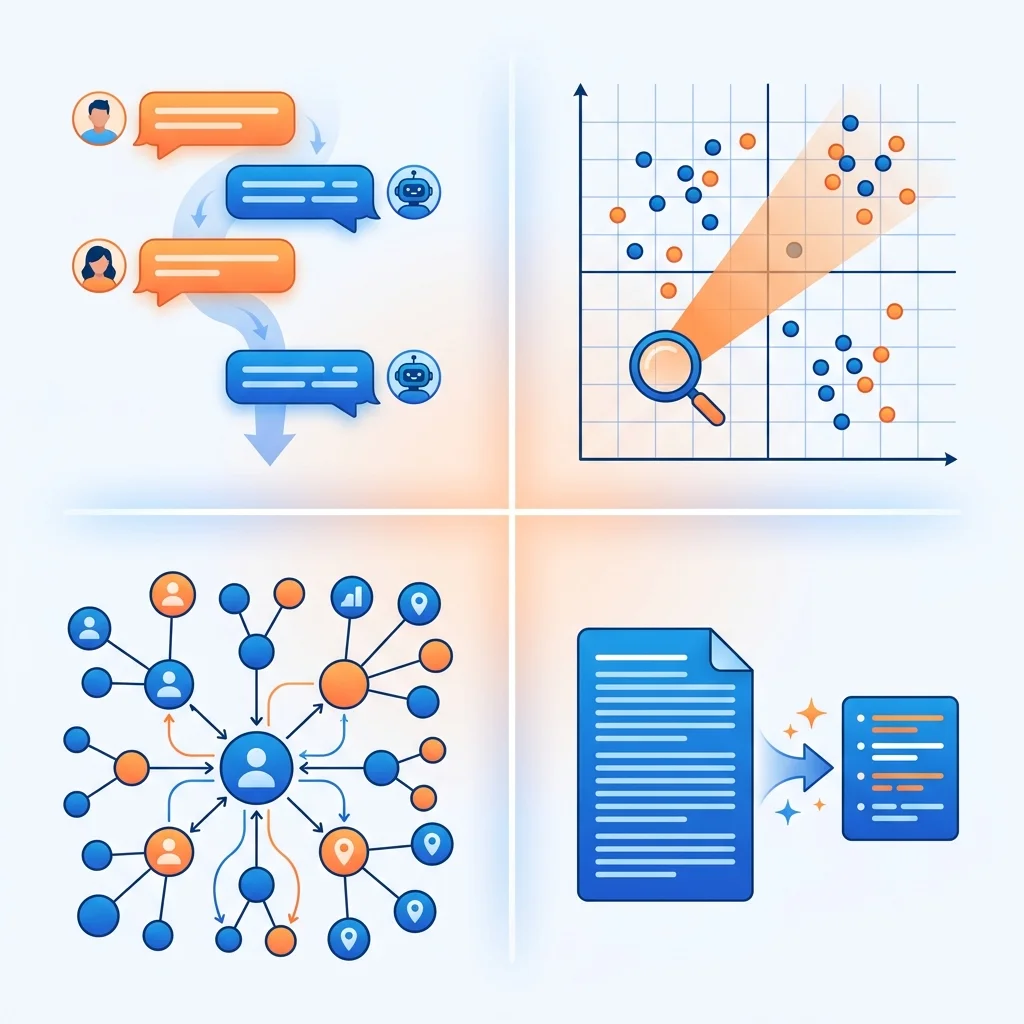
Agents without memory restart from zero every session. Agents with memory can recall user preferences, reference past conversations, and build knowledge over time. But memory is not one thing — it's a spectrum of architectures with different tradeoffs.
The four architectures below answer the same question differently: how should the agent store and retrieve what it knows?
Note:
Production agents rarely use a single memory architecture. The most common stack: conversational memory for the active turn + vector memory for factual recall + summary memory for long-running session history.
The Four Architectures
1. Conversational Memory
The simplest form. Every message — user, assistant, tool call, tool result — is appended to the context window. The model "remembers" by reading the full history every turn.
Turn 1: [system] [user: "I like dark mode"] [assistant: "Noted"]
Turn 2: [system] [user: "I like dark mode"] [assistant: "Noted"] [user: "What did I say?"]
Tools: Built into every LLM API. No external systems needed. Compaction (automatic summarization of older messages) available on OpenAI, Anthropic, and Letta.
When to use: Chatbots, short sessions, stateless tool calls. Every agent starts here.
When it breaks: Context window fills up. A 100-turn conversation with tool calls can exceed 128K tokens quickly. Compaction helps but loses detail. Cost scales linearly — every turn re-sends the full history.
2. Vector Memory (RAG-Based)
Facts are converted to embeddings and stored in a vector database. On each turn, relevant memories are retrieved by semantic similarity and injected into the context.
Store: mem0.add("User prefers dark mode", user_id="alice")
       mem0.add("User's timezone is UTC+1", user_id="alice")

Query: mem0.search("user preferences", user_id="alice")
       → ["User prefers dark mode", "User's timezone is UTC+1"]
Tools: Mem0 (managed, MCP support, temporal decay), Chroma (open-source, lightweight), Pinecone (managed, scalable), Qdrant (self-hosted, high performance).
Vector Memory Tools
Values: Free tier + paid plans
Values: Open source (Apache 2.0)
Values: Free tier + paid plans
When to use: Factual recall across sessions, user preferences, knowledge base Q&A.
When it breaks: Fails on connected reasoning. "What was Alice working on before her PTO?" requires understanding that a project started before a date, was handed off to Bob, and Bob filed the incident. Vector search retrieves relevant-sounding fragments but can't traverse relationships.
3. Graph Memory
Entities are stored as nodes and relationships as edges. Queries traverse the graph — "Alice → worked_on → Project → blocked_by → Incident."
CREATE (alice:Person {name: "Alice"})
CREATE (project:Project {name: "Checkout Redesign"})
CREATE (incident:Incident {id: "INC-42"})
CREATE (alice)-[:WORKED_ON]->(project)
CREATE (project)-[:BLOCKED_BY]->(incident)

MATCH (alice)-[:WORKED_ON]->(p)-[:BLOCKED_BY]->(i)
WHERE alice.name = "Alice"
RETURN p.name, i.id
Tools: Neo4j (most mature, Cypher query language), FalkorDB (ultra-low latency, optimized for agent workloads), Letta (memory blocks + archival memory with built-in context hierarchy).
When to use: Knowledge graphs, interconnected domain knowledge, multi-hop reasoning.
When it breaks: Setup complexity. You need a schema, data ingestion pipeline, and query patterns. Overkill when facts are independent (user preferences don't need a graph). Query latency can be higher than vector search for simple lookups.
4. Summary-Based Memory
Instead of keeping the full conversation, periodically summarize it and keep only the summary + recent messages in context.
Session start: Full conversation in context (2K tokens)
After 20 turns: Summarize turns 1-15 into 200 tokens
                Keep turns 16-20 in full + the summary
After 40 turns: Summarize turns 1-35 into 300 tokens
                Keep turns 36-40 in full + the running summary
Tools: LLM summarizer (built-in — "Summarize this conversation in 3 bullet points"), Letta's memory blocks (structured fields the agent updates itself), OpenAI/Anthropic compaction (automatic context window management).
When to use: Long-running agents, multi-session conversations, agents that accumulate state over hours or days.
When it breaks: Information loss. The summary captures what the summarizer thought was important, not necessarily what the next question needs. Repeated summarization compounds errors — a summary of a summary drifts from the original.
Decision Framework
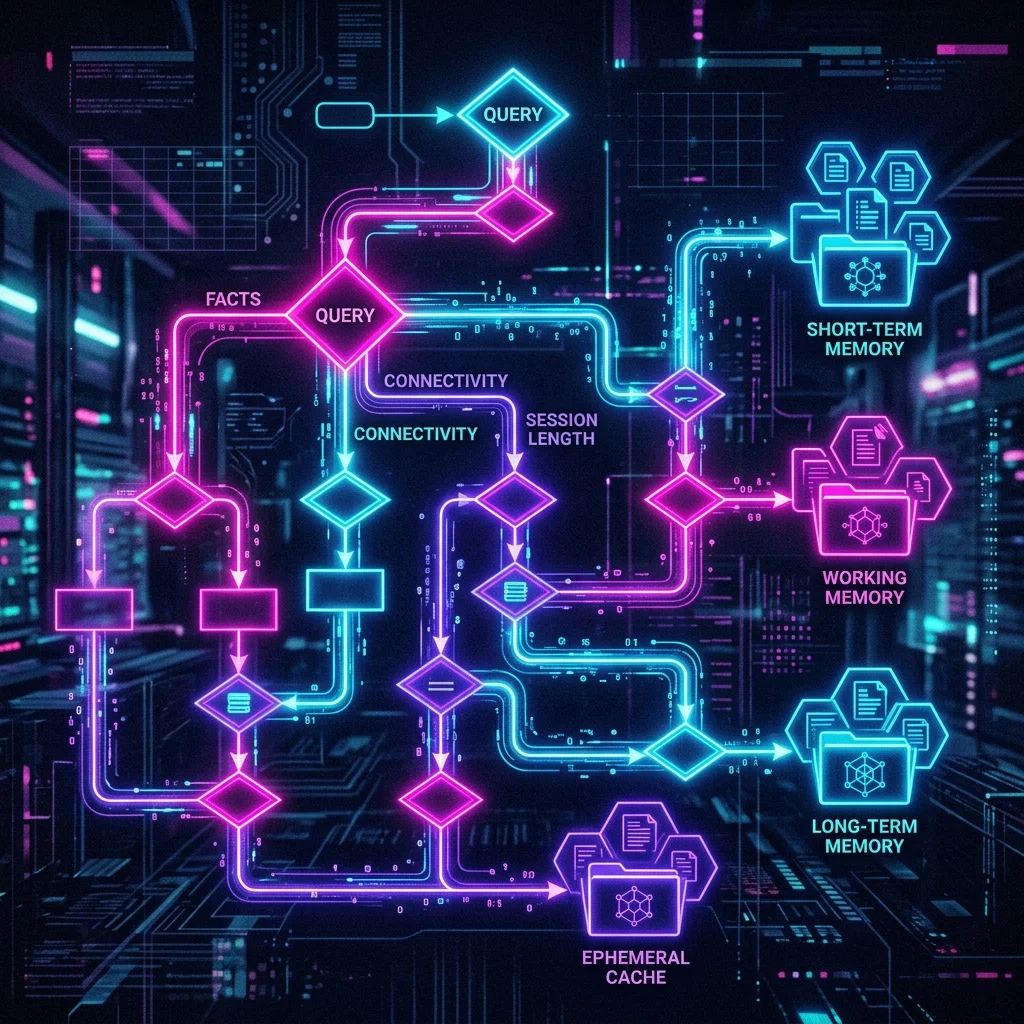
Does the agent need to remember facts across sessions?
├─ No → Conversational memory is sufficient
└─ Yes → Are the facts interconnected?
    ├─ No → Add vector memory (Mem0 or Chroma)
    └─ Yes → Add graph memory (Neo4j or FalkorDB)

Do conversations run longer than the context window?
├─ No → No summarization needed
└─ Yes → Add summary-based memory

Are you building a production agent?
├─ Yes → Mem0 (vector, managed) + summarization
└─ No → Chroma (vector, self-hosted) + compaction
Combining Architectures
The Reality: production agents use multiple memory layers.
Layer 1 — Active context: Last N messages in full (conversational)
Layer 2 — Session summary: Compressed history of the current session (summary)
Layer 3 — Long-term facts: User preferences, key decisions (vector via Mem0)
Layer 4 — Knowledge graph: Domain relationships (graph via Neo4j, optional)
Each layer has a different read/write pattern, latency budget, and cost profile. The agent decides which layer to query based on what it needs — "what did the user just say?" (layer 1) vs "what does this user always prefer?" (layer 3).
Example: Letta's Context Hierarchy
Letta models memory as blocks with explicit priority:
# Core memory: always in context
agent.memory.update("human", "John", "User's name")

# Archival memory: searchable, not always in context
agent.memory.add_to_archive("John mentioned he works at Acme Corp")
agent.memory.add_to_archive("John's last project was migrating from AWS to GCP")

# On query "What is John working on?", agent searches archival memory
# and injects relevant passages into the context window
Memory Latency and Cost
| Architecture | Write Latency | Read Latency | Cost per 1M queries | Scaling limit |
|---|---|---|---|---|
| Conversational | 0ms (no-op) | 0ms | $0 | Context window size |
| Vector | 50-200ms | 50-200ms | $0.10-1.00 (API) | Vector DB capacity |
| Graph | 10-100ms | 50-500ms | Self-hosted cost | Graph complexity |
| Summary | 1-5s (LLM) | 0ms | $0.01-0.10/summary | Summary quality decay |
Note:
Memory is not free. Vector memory costs embedding API calls + storage. Summary memory costs LLM calls. Graph memory costs query execution time. For simple agents with short sessions, conversational memory is free and sufficient. Add memory layers only when the agent demonstrably fails without them.
Key Takeaway
Start with conversational memory. When users complain "I told you this last time," add vector memory (Mem0 or Chroma). When you need multi-hop reasoning across facts ("what project was Alice on before the incident?"), add graph memory. Only add summarization when sessions run longer than your context window. Each layer adds cost and complexity — add them one at a time, not all at once.
Related Articles & Guides
 #agents
Building Autonomous Research Agents with Firecrawl & Brave Search
Production blueprint for building automated research agents using Firecrawl MCP, Brave Search API, and LLM synthesis with anti-bot resilience.
 #agent-skills
Building Executable Multi-File Agent Skills (Scripts, Assets & Tools)
Move beyond text-only prompts: build advanced Agent Skills bundling deterministic Python/Bash scripts, asset templates, and reference schemas for AI coding agents.
n8n Agentic Workflows: Connecting Webhooks to AI Coding Assistants
Automate GitHub PR triage, incident alerts, and database summaries by orchestrating n8n event-driven pipelines with autonomous coding agents.