Claude Code — Configuration Reference
Complete Claude Code configuration reference. Covers claude.json settings, MCP server setup, hook scripts, .claude/ directory conventions, and environment variable overrides.
Claude Code — Configuration Reference
Claude Code configuration lives in three places: claude.json, .claude/ directory, and environment variables. Here's how to set up each one.
claude.json
Located at ~/.claude/claude.json (global) or .claude/claude.json (per-project). Project settings override global.
{
  "model": "claude-sonnet-4-20250514",
  "maxTokens": 16000,
  "theme": "auto",
  "permissions": {
    "allow": [
      "Bash(npm run *)",
      "Bash(npx vitest *)",
      "Bash(git diff *)",
      "Bash(git status)",
      "Bash(git log *)"
    ],
    "deny": [
      "Bash(git push *)",
      "Bash(git commit *)",
      "Bash(npm install *)",
      "Bash(rm *)"
    ]
  },
  "env": {
    "NODE_ENV": "development"
  },
  "tui": {
    "syntax": {
      "theme": "github-dark"
    },
    "diff": {
      "style": "unified",
      "contextLines": 5
    }
  },
  "hooks": {
    "PostToolUse": [
      {
        "matcher": "Write|Edit",
        "hooks": [
          {
            "type": "command",
            "command": "npx eslint --fix ${FILE_PATH}"
          }
        ]
      }
    ]
  }
}
Model Settings
| Key | Description | Default |
|---|---|---|
model | Anthropic model ID | claude-sonnet-4-20250514 |
maxTokens | Max output tokens per request | Config-dependent |
thinkingEnabled | Enable extended thinking | false |
thinkingBudget | Extended thinking token budget | 4000 |
Permissions
Control what Claude Code can execute automatically:
{
  "permissions": {
    "allow": [
      "Bash(npm run build)",
      "Bash(npx vitest *)",
      "Bash(git status)",
      "Bash(git diff *)"
    ],
    "deny": [
      "Bash(git push *)",
      "Bash(npm install *)",
      "Bash(rm -rf *)",
      "Bash(sudo *)"
    ]
  }
}
Patterns support glob matching. Use * for wildcards. By default, Claude Code asks permission for each command.
TUI Settings
{
  "tui": {
    "syntax": {
      "theme": "github-dark"
    },
    "diff": {
      "style": "unified",
      "contextLines": 3
    },
    "pager": "less -R"
  }
}
.claude/ Directory
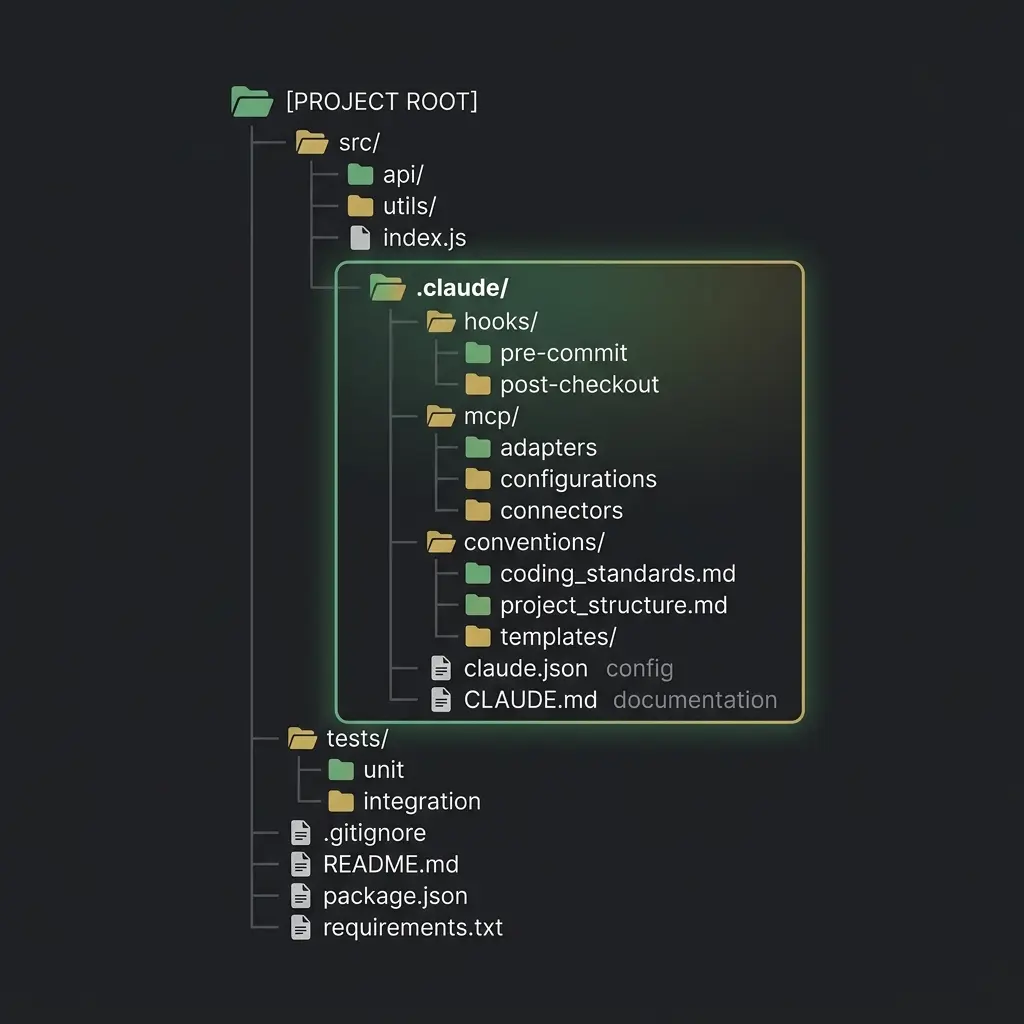
.claude/
├── claude.json           # Project-specific config
├── CLAUDE.md            # Project system prompt (alternative to root CLAUDE.md)
├── settings.json        # TUI preferences
├── hooks/               # Hook scripts
│   ├── pre-tool-use/
│   └── post-tool-use/
├── mcp/                 # MCP server configs
│   └── servers.json
└── conventions/         # Additional context files
    ├── coding-style.md
    └── git-conventions.md
MCP Server Configuration
Configure MCP servers in .claude/mcp/servers.json or claude.json:
{
  "mcpServers": {
    "filesystem": {
      "command": "npx",
      "args": ["-y", "@modelcontextprotocol/server-filesystem", "/Users/you/Documents"],
      "env": {}
    },
    "github": {
      "command": "npx",
      "args": ["-y", "@modelcontextprotocol/server-github"],
      "env": {
        "GITHUB_PERSONAL_ACCESS_TOKEN": "${GITHUB_TOKEN}"
      }
    },
    "postgres": {
      "command": "npx",
      "args": ["-y", "@modelcontextprotocol/server-postgres", "postgresql://localhost/mydb"]
    }
  }
}
See the MCP Implementation Guide for Claude Code for detailed MCP setup.
Hook Scripts
Claude Code supports pre/post tool-use hooks. Useful for auto-linting, formatting, or validation:
Post-tool-use hook (auto-lint after file writes):
# .claude/hooks/post-tool-use/lint.sh
#!/bin/bash
if [[ "$CLAUDE_TOOL_NAME" == "Write" || "$CLAUDE_TOOL_NAME" == "Edit" ]]; then
  npx eslint --fix "$CLAUDE_TOOL_PATH"
fi
Pre-tool-use hook (warn before sensitive commands):
# .claude/hooks/pre-tool-use/warn-commit.sh
#!/bin/bash
if [[ "$CLAUDE_COMMAND" =~ ^git\ push ]]; then
  echo "⚠️  Warning: Attempting to push to remote."
  echo "    Changes should be reviewed before pushing."
  # Return non-zero to block the command
  # exit 1
fi
exit 0
Project vs Global Config
| Scope | Path | Purpose |
|---|---|---|
| Global | ~/.claude/claude.json | Default settings for all projects |
| Project | .claude/claude.json | Override for this specific project |
| Project MD | CLAUDE.md or .claude/CLAUDE.md | Project-specific system prompt |
Project config takes precedence over global. CLAUDE.md can exist at project root or in .claude/.
Environment Variables
| Variable | Purpose |
|---|---|
ANTHROPIC_API_KEY | API authentication (required) |
ANTHROPIC_MODEL | Override default model |
ANTHROPIC_MAX_TOKENS | Max output tokens |
ANTHROPIC_BASE_URL | Custom API endpoint for proxies |
CLAUDE_CODE_DEBUG | Enable debug logging (1 or true) |
Related Pages
- Claude Code Getting Started — Installation and setup
- Prompt Engineering in Claude Code — CLAUDE.md patterns and prompts
- MCP Setup for Claude Code — Detailed MCP configuration
Related Articles & Guides
Antigravity CLI — Configuration Reference
Complete configuration reference for Antigravity CLI. Settings.json, environment variables, MCP servers, plugins, trusted folders, and project context files.
OpenCode — Configuration Reference
Complete OpenCode configuration reference. Covers opencode.json settings, MCP server integration, skills system, .opencode/ directory conventions, and environment variables.
Jcode — Configuration Reference
Complete jcode configuration reference. Covers config.toml sections, provider profiles, MCP server setup, memory, swarms, remote gateway, and environment variables.