Prompt Engineering in Claude Code
Master prompt engineering for Claude Code. CLAUDE.md system prompt patterns, extended thinking strategies, multi-file refactoring prompts, and autonomous coding workflows.
Prompt Engineering in Claude Code
Claude Code processes prompts differently than the Claude API or chat interface. It has access to your entire codebase, can read/write files, and executes terminal commands. Here's how to write prompts that leverage those capabilities effectively.
The CLAUDE.md System Prompt
CLAUDE.md (or .claude/CLAUDE.md) is read every session. It's the single most powerful prompt engineering tool in Claude Code. Structure it with clear, scannable sections:
Commands Section
List every project command Claude needs. Include npm scripts, test runners, linters, and any build tooling:
## Commands
- `npm run dev` — Start dev server on port 3000
- `npm run build` — Production build (checks types, lints, bundles)
- `npx vitest run` — Run all tests
- `npx vitest run -- path/to/test.ts` — Run specific test
- `npx eslint . --ext .ts,.tsx` — Lint check
Why this works: Claude Code doesn't need you to explain how to build your project. It just needs the exact commands. Provide —description flags so it understands what each command does.
Architecture Section
Give Claude a high-level mental model. Focus on conventions that differ from defaults:
## Architecture
- **Next.js 14 App Router** — files in `app/` are routes
- **Client/Server Split** — all components are server by default. Only add `'use client'` for event handlers, state, or browser APIs
- **Data Flow** — server components fetch data directly (async functions). No tRPC, no REST middleware
- **Database** — PostgreSQL via Prisma. Schema in `prisma/schema.prisma`
- **Auth** — Clerk middleware protects `/app/(auth)/*` routes
Pattern: Don't list every file. Describe the patterns and conventions that aren't obvious from reading the code.
Conventions Section
Codify the rules you'd tell a new teammate:
## Conventions
- Use TypeScript strict mode — no `any`, no `as` casts without justification
- Path alias: `@/` maps to project root
- Imports order: React → external deps → internal `@/` → relative
- No barrel exports (index.ts re-exporting everything)
- Prefer named exports over default exports
- Error boundaries wrap every route segment
Constraints Section
The things Claude Code should NOT do:
## Constraints
- NEVER install packages without asking
- NEVER modify prisma/schema.prisma without explicit instruction
- NEVER delete files — rename to .old instead
- NEVER commit to git — I'll review and commit myself
- NEVER use `eval()` or `new Function()` in any code
How Claude Code Processes Prompts
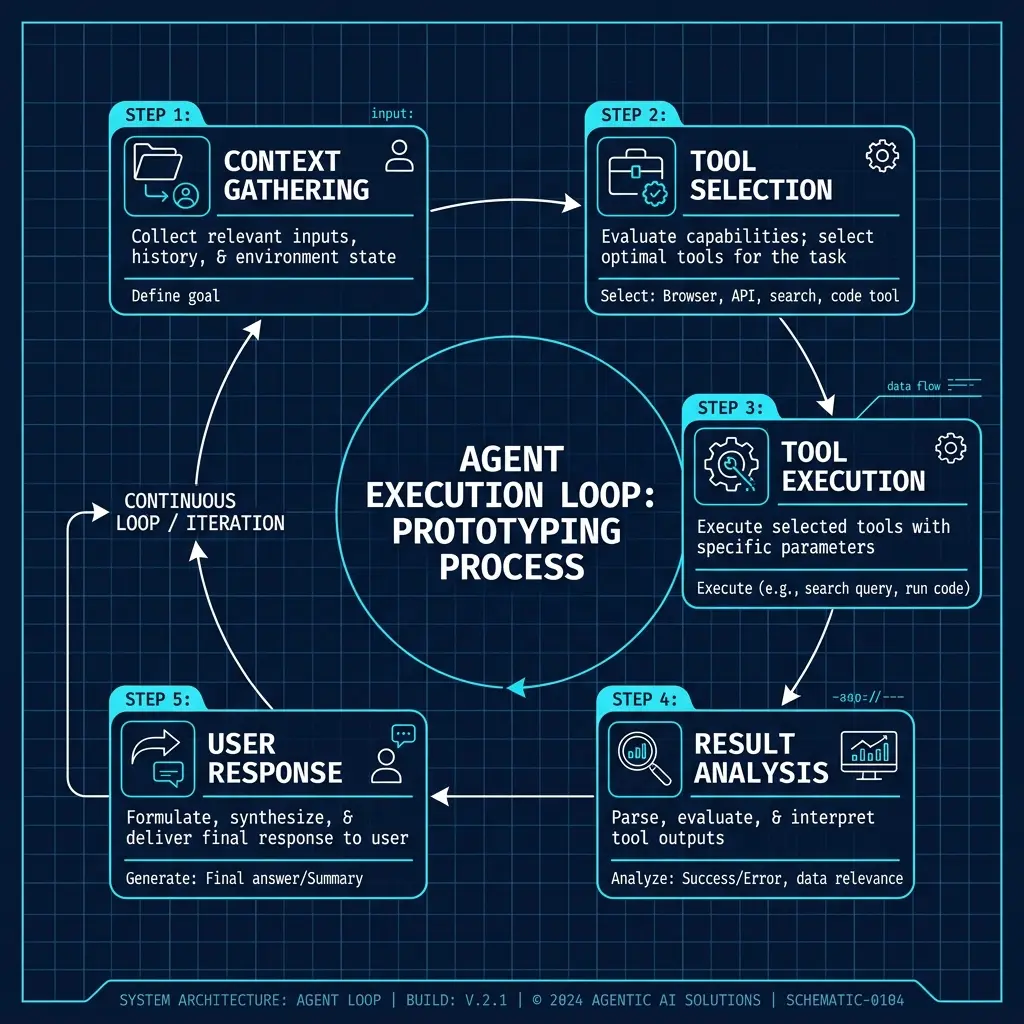
Understanding the loop matters:
- Context gathering — Claude reads relevant files based on your prompt
- Tool selection — It decides: read more files, run a command, write code, or ask you
- Tool execution — Runs the tool (reads file, executes command, writes code)
- Result analysis — Reviews what happened and decides next step
- Response — Shows you the result and either continues or asks for input
Context Window Strategy
Claude Code has a 200K token context window but loads files lazily. Optimize:
- Mention specific files — "Check
src/auth/middleware.tsfor the auth logic" is better than "How does auth work?" - Use /file sparingly — Only add files Claude needs. Don't dump your entire codebase
- Let Claude explore — It knows which files are relevant. Trust its file-reading judgment
- Compact often —
/compactsummarizes history. Use after 10+ turns to keep context fresh
Prompt Patterns for Claude Code
Pattern 1: The Problem Statement
> In src/components/DataTable.tsx, sorting by date column returns
  incorrect order. The sort function on line 142 compares strings
  instead of dates. Fix it and write a test.
This prompt does 5 things:
- Specifies the exact file (
src/components/DataTable.tsx) - Describes the bug (sorting by date is wrong)
- Identifies the root cause (line 142, string comparison)
- States the fix (compare as dates)
- Requests verification (write a test)
Pattern 2: Multi-File Refactoring
> Refactor the auth system:
  1. Move all Clerk-specific code from components into lib/auth/clerk.ts
  2. Create lib/auth/types.ts with shared auth types
  3. Update all imports in app/ and components/
  4. Don't change any behavior — this is a pure refactor
  5. Run type check when done: npm run typecheck
Key elements:
- Numbered steps with clear boundaries
- Modifies vs doesn't change — explicit scope control
- Verification step — run type checks after
Pattern 3: Autonomous Investigation
> I'm seeing 500 errors in production on the /api/checkout endpoint.
  This is an Express.js backend at src/server/routes/checkout.ts.

  Steps:
  1. Read the endpoint code and trace the full request path
  2. Check error handling — are errors caught or unhandled?
  3. Check database queries — any N+1 issues or missing indexes?
  4. Check input validation — what happens with malformed data?
  5. Report findings WITHOUT making changes. I'll decide what to fix.
Why the last line matters: Without it, Claude Code might start patching things. The "report first, don't fix" constraint prevents premature changes.
Pattern 4: Extended Thinking for Complex Problems
For architectural decisions or complex logic, enable extended thinking:
> /thinking on
> We need to add real-time collaboration to our drawing app
  (currently single-user with canvas API).

  First, analyze the current architecture in src/canvas/.
  Then propose 3 approaches with tradeoffs:
  - WebSocket (ws library)
  - Server-Sent Events
  - CRDT library (Yjs)
  Include latency, complexity, and scaling considerations.

  Do NOT implement anything. Just the analysis.
Extended thinking (enabled with /thinking) gives Claude more compute time. Best for:
- Architectural decisions with tradeoffs
- Complex algorithm design
- Multi-file refactoring plans
- Security analysis
Common Pitfalls
1. Vague Prompts
> Fix the bugs   ← Bad
> Fix the memory leak in src/services/image-processor.ts —
  the sharp() instance isn't being destroyed after use  ← Good
2. Missing Verification Steps
> Add dark mode   ← Bad
> Add dark mode with next-themes:
  1. Install next-themes
  2. Wrap layout with ThemeProvider
  3. Add toggle to navbar
  4. Verify: `npm run dev` and toggle theme  ← Good
3. Unbounded Scope
> Refactor the entire codebase   ← Bad
> Refactor src/services/ — extract shared validation logic
  into lib/validators.ts. Only touch files in src/services/.  ← Good
4. No Explicit Constraints
Without a CLAUDE.md Constraints section, Claude Code might:
- Install packages you didn't ask for
- Delete files instead of renaming
- Commit changes without review
- Change unrelated code it thinks "needs fixing"
Related Pages
- Claude Code Getting Started — Installation and setup
- Claude Code Configuration — claude.json, MCP, hooks
- Prompting Claude Code (Prompts Section) — Detailed CLAUDE.md command patterns
- Autonomous Coding Strategies (Prompts) — Guardrails and recovery patterns
Related Articles & Guides
Jev Prompt Engineering — Questions, Criteria & State
How to write Jev questions and criteria that hold up: one judgment per question, situation-based criteria, clean state, parallelism, and the model's known failures.
Pi — Terminal AI Coding Agent
Complete guide to pi, Mario Zechner's minimal terminal coding agent. Covers installation, prompt engineering, context files, skills, and the lean-harness philosophy.
Prompt Engineering in Pi
Master prompt engineering for pi, the minimal terminal coding agent. Context files, system prompt files, slash commands, message queueing, and the four built-in tools.